 Local-first · Fully offline
Your knowledge base,
as plain files.
Compendium is a fast markdown knowledge base that keeps every note
as a plain .md file on your own disk. A live-preview
editor that renders as you type, organised in real folders. No
database, no cloud account, no lock-in.
Runs as a desktop app on macOS, Windows & Linux.
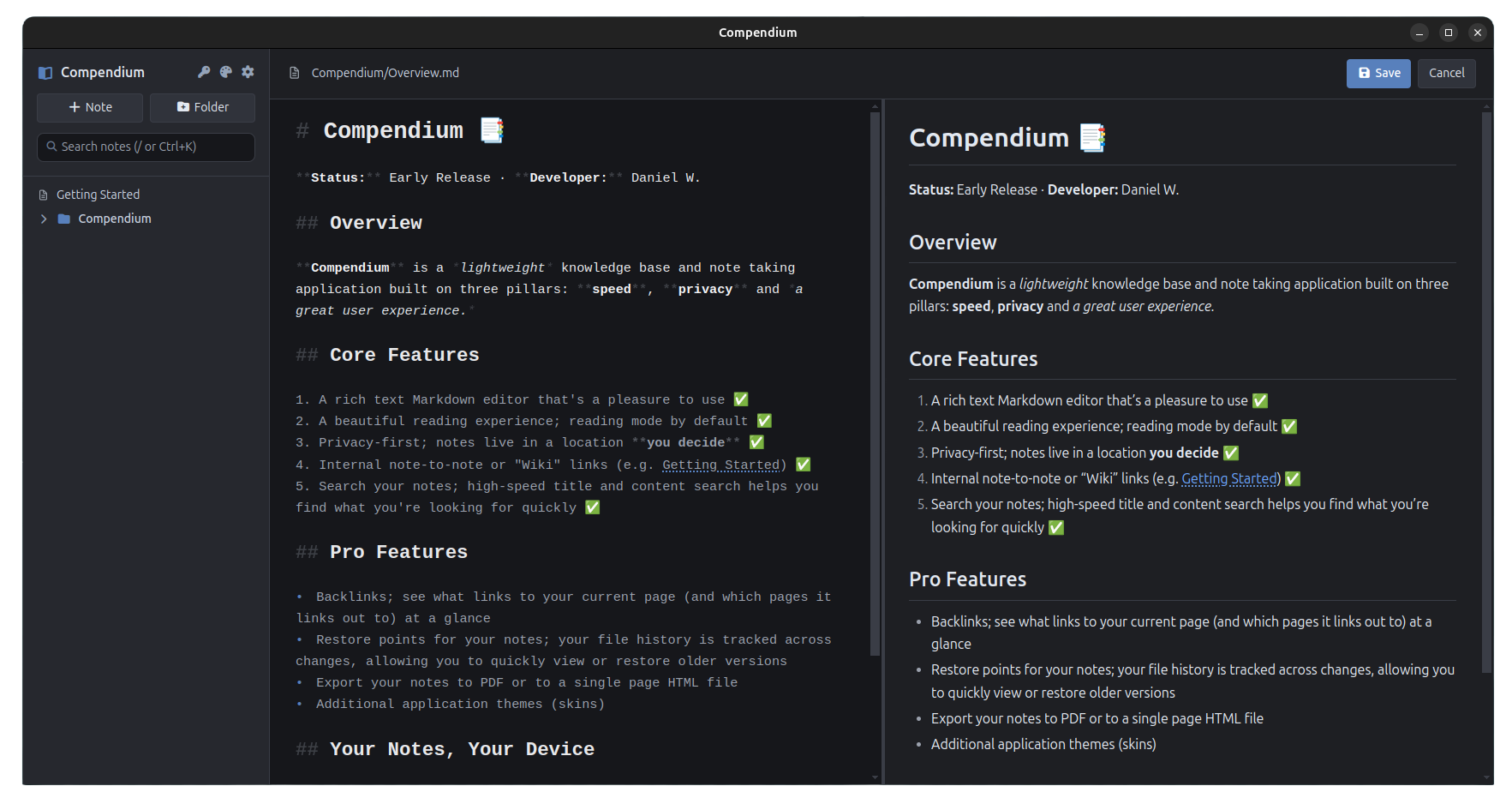
Markdown that reads like the finished page
Headings, bold, links and tables take their real shape as you type, while the markup fades into the background.
Write it, see it, in the same place
Syntax stays out of the way
Type **bold** or # Heading and it
styles instantly. The raw characters stay faint in the
background, so your text reads like the finished page while
you write.
Tables and images render as you go Build GFM tables that stay column-aligned, and drop in images that show inline — resolved from the note's own folder, not a cache.
Folders you can see on disk The sidebar is your actual directory tree. No tag database to curate — move a note and the file moves with it.
Link notes, both ways
Connect notes with [[Folder/Note]] wiki links and
Ctrl-click to follow. Titles and full text are searchable from
one keyboard-driven box.
Plain .md, nothing else
Every note is a markdown file in a folder you choose. Open the same files in VS Code or any editor — Compendium just reflects what's on disk.
Offline, no account
No CDNs, no telemetry, no sign-in. The app runs locally and never phones home, so your notes stay on your machine. Works on a plane.
Compendium Pro
Everything above is free. A one-time licence adds some bonus features for people who keep a knowledge base for years, not days.
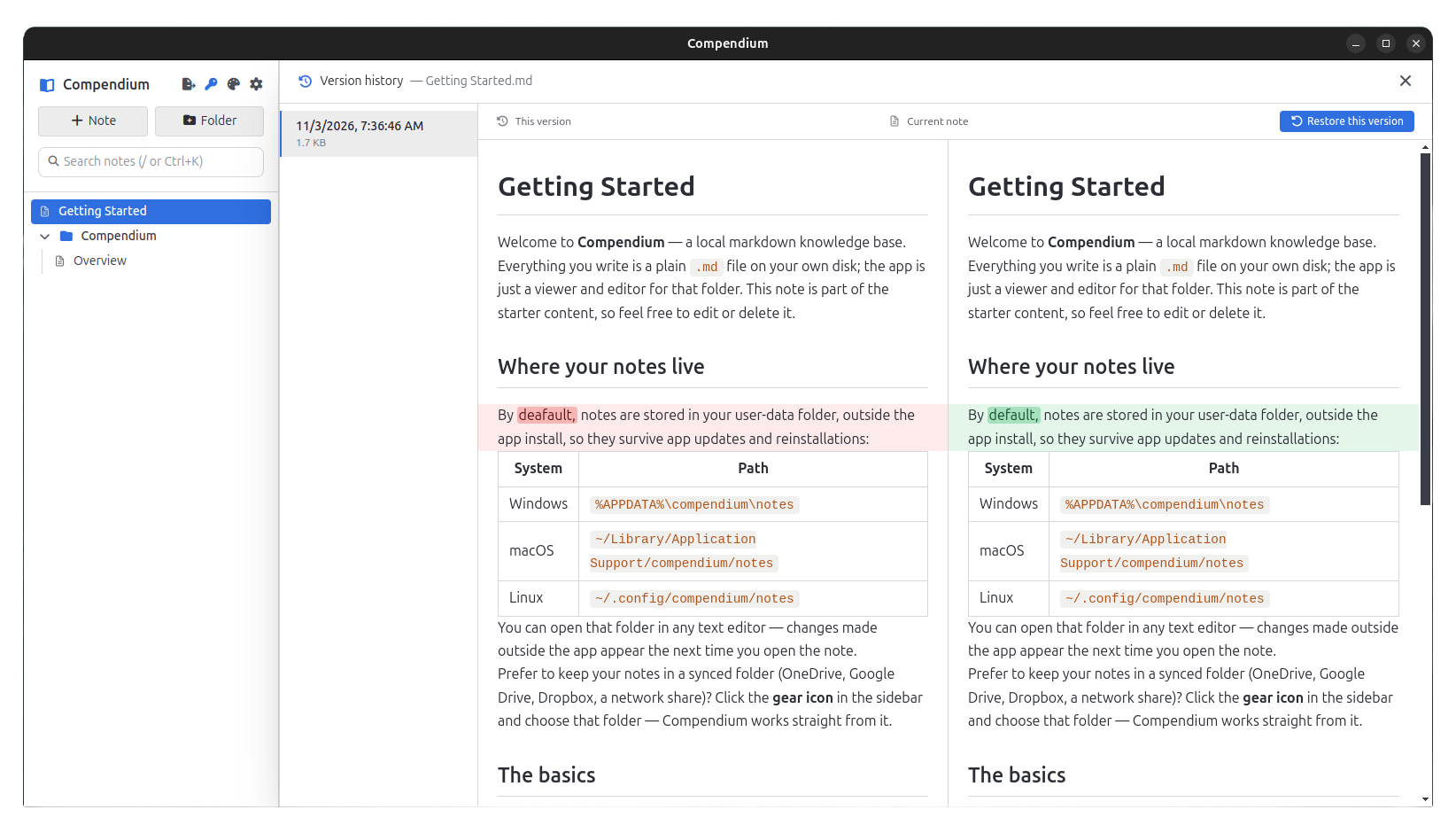
Go back to any version, see exactly what changed
Every save is a restore point Compendium keeps a timeline of snapshots for each note. Pick one and bring it back with a single click.
A diff you can actually read The old and current versions sit side by side, both rendered as real markdown — not raw text. Added words tint green, removed ones red, down to the word.
Kept next to your notes History lives alongside your files and travels with whatever sync you already use. No cloud, no account.
Backlinks
Under each note, see what links to it and what it links out to. A folder of files becomes a web you can walk in both directions.
Export & print
Turn the whole base, or one folder, into a single self-contained HTML file that works offline with no extra assets — or send it straight to the print dialog to save as PDF.
Themes
Swap the look with a set of polished light and dark themes on top of the built-in default — including the light theme shown above.
Simple, one-time pricing
The editor is free forever. One licence unlocks the Pro features — no subscriptions, ever.
Free
The full editor
- Live-preview markdown editor
- Folders, wiki links & search
- Images & tables
- Fully offline, your files on disk
- macOS, Windows & Linux
Personal
For individuals
- Everything in Free, plus:
- Version history & rendered diffs
- Backlinks
- Export to HTML & PDF
- Extra themes · use on all your devices
Organisation
For teams & companies
- Everything in Personal
- Use across your whole organisation
- One licence, unlimited internal seats
- Priority email support
- Free updates
Your licence is tied to your email and works on every device you own — no per-device charge, no activation limits.
Questions
Can I use one licence on multiple devices?
Yes. A personal licence works on every device you personally use — laptop, desktop, whatever. You buy it once, not per machine.
Where are my notes stored?
As plain .md files in a folder on your own disk
that you choose. Point it at a cloud-synced folder (Dropbox,
OneDrive, iCloud) to keep them across machines. Nothing is
stored on our servers — we don't have any.
What does the licence actually unlock?
The Pro features: version history with rendered diffs and restore, backlinks, export to HTML and PDF, and the extra themes. Everything else — the live-preview editor, folders, wiki links, search, images and tables — is free and always will be.
What about version history — is it in the cloud?
No. History is kept in a hidden folder right next to your notes, so it travels with them through whatever sync you already use and needs no account. Each save keeps the previous version to compare and restore.
Is it a subscription?
No. It's a one-time payment. You own the licence and get free updates — no recurring charges.
Do I need an internet connection?
Only to buy the licence. Everything else — editing, history, export, even checking your licence — works fully offline.